


Ascension One
4.7314.00 Reviews
App Specs
- Version
- 4.6.0
- Updated On
- License
- Free
- Downloads
- 100,000+
- Developer
- Ascension Health
- Categories
- Medical
- Platform
- Android
Screenshots
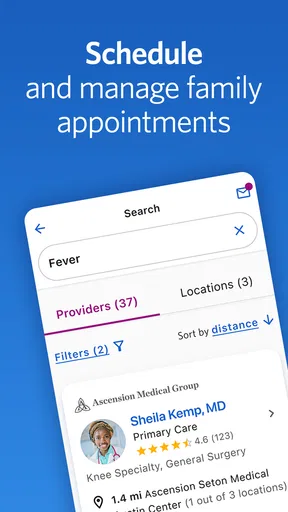
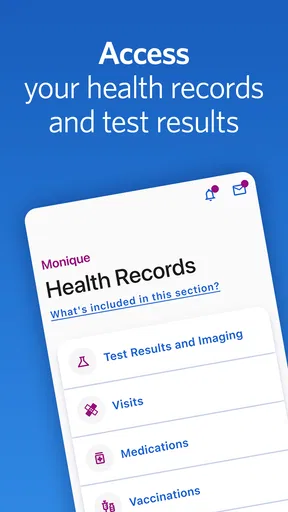

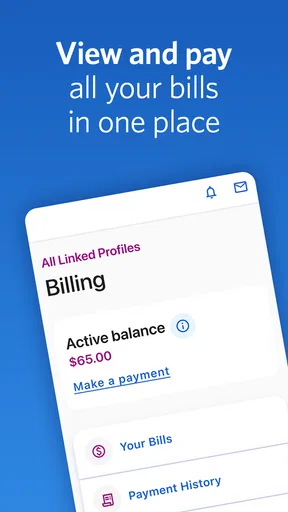

 Analysis by AppCompare
When I use a care app on the move, the network connection can matter as much as the menus: a sign-in, an appointment detail, or a message is only useful when I can reach it at the right moment. Ascension One is built around care at Ascension sites, so I see it as a practical companion for people who already receive care within that system, rather than a general health app for everyone. Its value depends on whether it brings the parts of that relationship I need into one place and whether I can get to them reliably when I’m away from home.
Who benefits most from having care details in one place
I’d consider Ascension One if I were already managing care through Ascension and wanted a single mobile starting point instead of relying on scattered reminders, saved phone numbers, and separate web pages. The developer is Ascension Health, and the app is free, which makes trying it a low-commitment choice for an existing patient. It is a medical app, not a substitute for professional advice or urgent care, and I would not treat it as a general-purpose symptom checker.
The distinction from a typical health-and-fitness app is important. A fitness tracker is mainly about personal activity, while a broad medical reference app may provide general information without being tied to a particular care provider. Ascension One is more relevant when the task concerns care at Ascension sites. If I receive care elsewhere, or want one tool that gathers records from several unrelated providers, I would first check whether this app fits that situation rather than assume it will replace every patient portal I use.
The app has a 4.7 average from around 4,300 ratings, and it has been installed over 100,000 times. That level of use suggests it is established among people looking for an Ascension-focused option, but popularity alone does not tell me whether it fits an individual’s clinic, habits, or comfort with mobile account access. I’d judge it by the specific care tasks I need to handle, not by its rating in isolation.
Network-dependent moments and a useful routine
For a care app, connectivity is part of the experience rather than a background technical detail. I would plan to open Ascension One while I have a stable connection when reviewing care information or preparing for an appointment, instead of waiting until I am in a crowded lobby or moving between buildings. That small habit reduces the chance of trying to sort out a login or load a page at exactly the moment I’m already distracted.
A realistic use case is checking the app at home the evening before an appointment, then reviewing the information again while travelling if the connection is dependable. I’d also keep any essential appointment details somewhere I can readily consult, such as a calendar reminder, rather than making the app my only fallback. That is not a criticism of this particular service; it is sensible planning for any account-based medical tool when a mobile signal can fluctuate.
One useful trade-off is that a provider-focused app may save time by keeping care-related tasks together, but it also makes access to those tasks dependent on the app, account, and connection working when needed. I would test the basic sign-in and navigation before relying on it for a time-sensitive routine. If I’m helping a family member, I’d confirm whose account is being used and make sure I’m not confusing one person’s information with another’s.
Worth Reading Before You Choose

EA SPORTS FC Mobile 26 Is a Bigger Football Game, but It Takes Time

Flipboard Shows What News Apps Must Do Beyond the Feed

Switching to Android Auto Means Rethinking Your Driving Routine

Google Calendar Makes a Crowded Week Easier to Manage

Ludo King Makes the Most of the Minutes Between Plans

Baby Panda World Brings Quick Play to Modern Phones, but Its Game Library Feels Busy
Mobile use, interruptions, and recovery
Phones are often used in less-than-ideal conditions: a quick check between errands, a moment in a waiting room, or a short break at work. I find that the best approach is to handle one task at a time rather than open a medical app while rushing through several distractions. If the app asks me to authenticate again or a page takes time to load, I can pause and retry when I have a steadier connection instead of repeatedly tapping and risking confusion about what has actually gone through.
If something fails to load, I would first check whether other apps can reach the internet, then try again on a stronger connection. If the problem appears tied to the account or a care task, I’d use the appropriate Ascension support or care-team route rather than assume reinstalling the app will fix it. For urgent symptoms or an emergency, I would contact emergency services or a clinician directly; an app is not the right channel for immediate help.
For a data-conscious routine, I’d avoid repeatedly refreshing pages when reception is weak and wait until I’m on a reliable connection to review information that matters. I’d also use ordinary phone precautions: keep the device secured, avoid sharing account credentials, and sign out or lock the phone if other people may access it. These steps are especially worthwhile when a device is shared within a household.
Fit, limits, and practical expectations
Ascension One is available at no charge and is rated for Everyone. Its current version is 4.4.0, and it requires Android 8.0 or later. Those details make the basic compatibility check straightforward for Android users; anyone on iOS should check the relevant App Store page for device requirements before installing. The app was released on December 20, 2023, so it is a relatively recent addition to the mobile care options people may encounter.
I would skip it if I do not receive care through Ascension, if I want a comprehensive cross-provider organizer, or if I prefer to handle every interaction by phone or in person. I’d also avoid making it my sole source of critical information while travelling somewhere with unreliable connectivity. In those cases, a provider’s direct phone line, a calendar reminder, or the relevant health system’s own patient portal may be a better fit.
My overall view is that Ascension One makes the most sense as a convenient access point for people whose care already runs through Ascension. The key question is not whether a medical app sounds useful in general, but whether the tasks I need are available for my care and whether I can access them when I need them. If both answers are yes, it is worth trying; if not, another route will be more dependable.
The Cosmic Adventure Begins
Right from the get-go, Ascension One throws you into a universe that’s as beautiful as it is mysterious. The graphics are stunning, with vibrant cosmic landscapes that make every level feel like a work of art. The game’s design is intuitive, making it easy to navigate even if you’re not a seasoned gamer.
As you start, you're introduced to a tutorial that’s actually helpful instead of annoying. It eases you into the gameplay mechanics without holding your hand too much. I appreciated how the game respects the player's intelligence, allowing you to explore and learn the ropes at your own pace.
Gameplay: Strategy Meets Creativity
The core of the game revolves around strategic decision-making paired with a bit of creativity. You’re tasked with building and expanding your celestial empire, which involves managing resources, forming alliances, and sometimes engaging in battles. It’s not just about brute force; you’ll need to use your brain.
One of the standout features is the ability to customize your universe. The choices you make impact the gameplay significantly, giving it a personalized touch. I found myself lost in tweaking my strategies, trying different approaches to see what would best suit my style.
Soundtrack and Atmosphere
If there’s one thing that elevates the experience, it’s the soundtrack. The music is ethereal, perfectly complementing the game’s theme. It’s subtle yet powerful, drawing you deeper into the cosmic realm. I often found myself playing just to enjoy the soothing tunes.
The sound effects are equally immersive, from the whoosh of a spaceship to the distant echo of a cosmic event. Together, these elements create an atmosphere that’s hard to pull away from.
Why You’ll Keep Coming Back
So, what makes Ascension One a game worth playing? For starters, it’s the challenge. The game is never stale, constantly throwing new elements and challenges your way, keeping you on your toes. The AI is smart, and the multiplayer aspect adds a competitive edge that’s both thrilling and frustrating in the best way possible.
Moreover, the community aspect is thriving. Being part of alliances and interacting with other players adds a social layer that enhances the experience. It’s always fun to compare strategies and see who’s got the upper hand.
A Few Final Thoughts
In conclusion, Ascension One is a well-crafted game that’s perfect for anyone who loves strategy and cosmic adventures. It’s got the right mix of challenge and creativity, ensuring that you’ll be entertained for hours on end. Whether you’re playing solo or diving into multiplayer mode, there’s something for everyone.
I’d say give it a shot. Who knows, you might just find yourself lost in the stars, strategizing your rise to cosmic dominance. Happy gaming!
Pros
- Intuitive user interface for easy navigation.
- Comprehensive features for task management.
- Seamless integration with other apps.
- Customizable notifications and reminders.
- Supports offline mode for remote access.
Cons
- Limited free version functionality.
- Occasional sync delays with cloud.
- Requires account registration to use.
- Heavy on battery during extensive use.
- No dark mode option available.
FAQs for Ascension One
What is Ascension One and how does it work?
Ascension One is a mobile app designed to enhance mindfulness and meditation practices through guided sessions and personalized features. It provides users with a library of meditative tracks and interactive tools to help improve focus and reduce stress. The app tracks progress and offers recommendations based on user activity, making it suitable for both beginners and experienced practitioners.
Is Ascension One available for both Android and iOS devices?
Yes, Ascension One is available on both Android and iOS platforms. Users can download the app from the Google Play Store for Android devices and the Apple App Store for iOS devices. The app is optimized for various screen sizes and offers a seamless experience across different devices.
Does Ascension One require a subscription, or is it free to use?
Ascension One offers a free version with limited features, allowing users to explore basic meditative practices. For access to the full library of sessions and advanced features, a subscription is required. The app offers monthly and annual subscription plans, often with a free trial period for new users to explore its premium content.
What are the unique features of Ascension One compared to other meditation apps?
Ascension One stands out by offering AI-driven personalized meditation recommendations based on user behavior and preferences. It also includes an interactive community feature where users can share experiences and support each other. Additionally, the app regularly updates its library with new content, ensuring a fresh and engaging experience.
How can I track my progress with Ascension One?
Ascension One includes a comprehensive progress tracking system. Users can set personal goals and monitor their meditation habits through detailed statistics and visual charts. The app provides feedback and insights into session durations, frequency, and overall improvement, helping users to remain motivated and on track with their mindfulness journey.


